Context
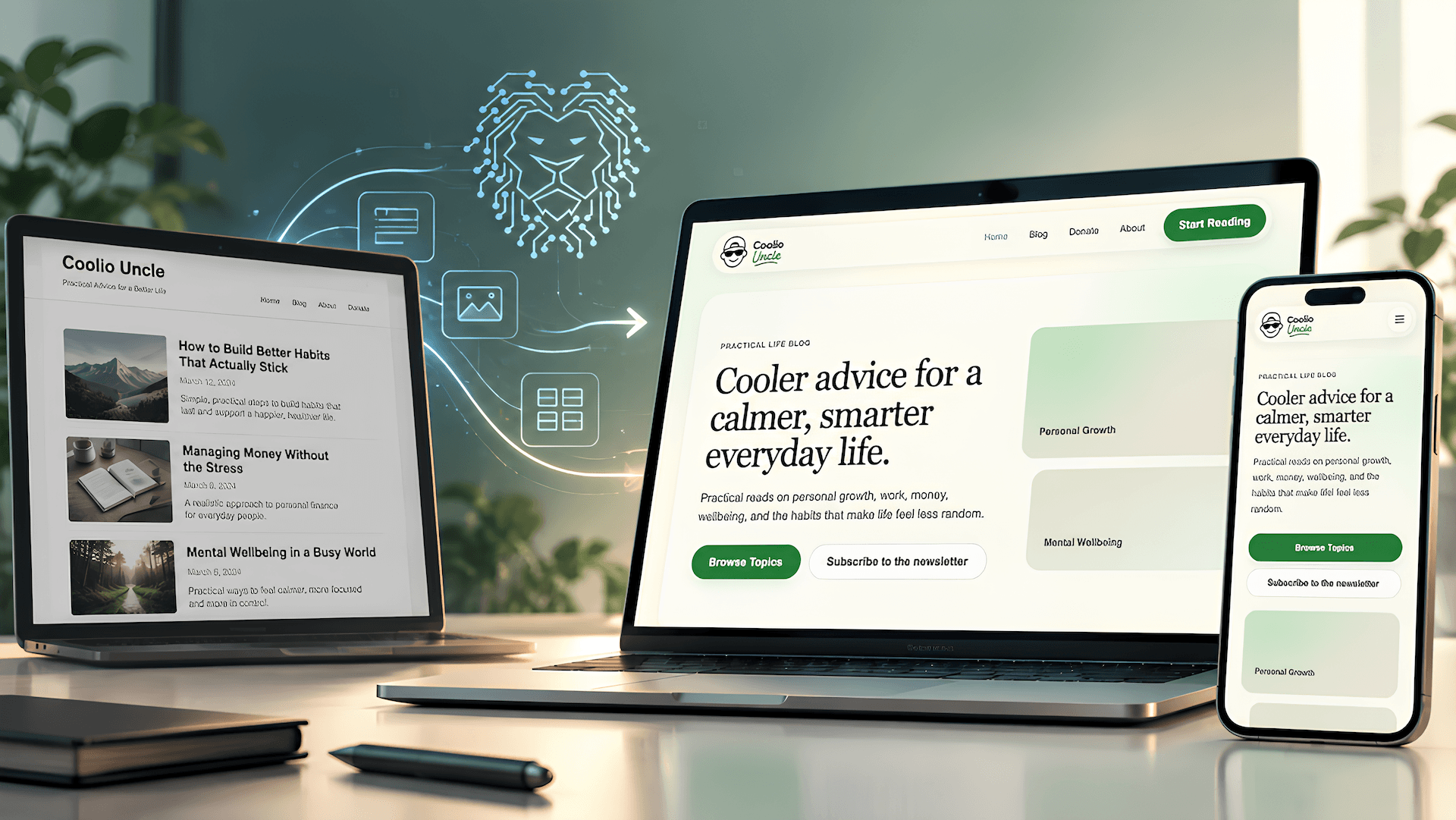
CoolioUncle.com was already a live WordPress content platform. Its pages, templates, navigation, and content relationships reflected years of product decisions. The redesign began by understanding the existing system, then building a clearer experience from it.
We mapped the product, redesigned its information hierarchy and interface, and converted the approved direction into a dynamic React prototype. The prototype gave the team a navigable reference for review and subsequent AI-assisted development. React served as a temporary prototyping layer. WordPress remained the production platform.
The problem
CoolioUncle.com was an established WordPress product, not a blank canvas. Its pages, templates, navigation, reusable patterns, and content relationships already carried product meaning. A visual redesign that ignored those decisions could lose useful behavior along with legacy inconsistencies.
Before changing the interface, we needed to identify what should remain, change, merge, or disappear. That meant looking across article and archive pages, navigation paths, recurring UI elements, responsive behavior, and the structure behind the content.
The handoff to development presented a second challenge. Static screenshots and loosely written tickets leave interaction, page relationships, and responsive decisions open to interpretation. For AI-assisted implementation, those gaps can turn into invented product choices. We wanted the approved experience to be explicit enough to guide engineering without asking AI to design the product at the same time.
Constraints
The redesign had to respect an existing WordPress content platform and preserve the meaning of its content relationships. It also needed to account for responsive behavior, semantic structure, SEO, production performance, and editorial usability.
Product exploration could use a flexible prototyping environment, but the final site did not need a permanent React dependency. WordPress and Gutenberg remained the appropriate production context. The prototype therefore had to communicate design intent clearly while leaving room for implementation choices suited to PHP, JavaScript, SCSS, and the CMS.
No traffic, conversion, speed, or delivery gains are claimed here. The work described is the product mapping, redesign, prototype, and handoff approach.
The solution
1. Map the existing product
We inspected CoolioUncle.com as a complete product rather than a set of isolated screenshots. Pages, templates, navigation paths, interface patterns, content structures, and responsive states were mapped before redesign work began. The principle was simple: understand the system before changing it.
2. Redesign the experience
With the product map in place, we developed a more consistent design direction. The work addressed information hierarchy, page composition, visual language, typography, spacing, navigation, and reusable components. Article and archive presentation were considered together so the system would feel coherent across the experience and across screen sizes. Design decisions were directed and refined through review.
3. Build a dynamic product reference
The approved direction was converted into a React prototype. React was used for dynamic prototyping, not as the production CMS architecture. The prototype made component relationships, real navigation, page transitions, interaction, representative content, hierarchy, spacing, and responsive layouts visible in one place. It expressed more of the intended product than static mockups could on their own.
4. Review and refine
- Inspect
- Design
- Prototype
- Review
- Refine
Reviewers could navigate the redesigned experience as a product, identify gaps between screens, and refine behavior before committing those choices to WordPress code.
We separated product decisions from implementation decisions.
The validated prototype gave subsequent AI-assisted development a coherent interface to reference. AI was not asked to determine what CoolioUncle.com should look like while engineering the production version.
Implementation
The implementation bridge followed a clear sequence:
- Existing site
- Product mapping
- Redesigned experience
- Dynamic prototype
- Validation
- AI-assisted production development
Tools and workflow
OpenAI Product Design supported design exploration, redesign iteration, translation of selected visual directions into interactive interfaces, prototype refinement, and checks against design intent. People directed the product decisions and reviewed the results.
Browser kept the process grounded in the actual product. We used it to navigate existing pages and flows, inspect page relationships and responsive behavior, and review redesign and prototype states.
React provided a componentized, interactive prototyping environment. It let the team express reusable structures, navigation, responsive layouts, and behavior as a navigable product reference. The prototype served both as a validation environment and as an AI-readable specification for later engineering.
Production architecture
The React prototype was temporary. Production remained WordPress. The validated design could guide implementation in WordPress and Gutenberg, with semantic HTML, SEO, performance, responsiveness, maintainability, and CMS usability shaping engineering decisions. PHP, JavaScript and SCSS belonged to that production context where appropriate. The prototype did not dictate a framework dependency.
Outcomes
We mapped the existing product before redesigning it, then turned the approved direction into a navigable React prototype. The team could review page relationships, interactions, and responsive behavior in context rather than infer them from static screens.
That prototype became a shared reference for the WordPress build. It made the intended experience concrete enough for AI-assisted development to focus on implementation choices while the product direction stayed clear.
What we learned
Better AI development starts with better context. Mapping a legacy product before redesign protects the decisions embedded in its structure. Separating product exploration from production implementation makes the intended experience easier to review and easier to communicate.
Static designs remain useful, but they do not always specify navigation, states, relationships, and responsive behavior. An interactive prototype can carry those decisions across the design and engineering boundary. AI-assisted implementation becomes more reliable when it receives concrete structure and behavior instead of being asked to infer them from disconnected screens.
The production architecture still has to fit the product. For CoolioUncle.com, WordPress content management, Gutenberg editing, semantic markup, SEO, performance, and maintainability shaped that choice. React fulfilled its purpose as a temporary prototype.
-
MapUnderstand the existing product.
-
RedesignShape the experience.
-
PrototypeMake the journeys interactive.
-
ValidateReview and refine decisions.
-
BuildEngineer the approved experience.